🎯 What is Straight Line Depreciation?
Straight-line depreciation is the simplest method for calculating how an asset loses value over time. It spreads the amount of depreciation evenly over the useful life of the asset. Every year gets the same depreciation amount! Straight-line depreciation is computed by taking the original cost of the asset minus its salvage value then dividing the result of that by the useful life of the asset.
Cost: Original purchase price of the asset
Salvage Value: Estimated value at the end of its useful life
Useful Life: Number of years you expect to use the asset
Book Value: Current value of the asset (Cost – Accumulated Depreciation)
Let’s say that you purchase a piece of equipment costing $50,000. You estimate that you will use the piece of equipment for ten years. You believe that you will be able to sell the equipment for $1000 at the end of the ten years. The formula for computing the straight-line depreciation is:

$50,000 cost – $1,000 salvage / 10 years of useful life = $4900 annual depreciation The depreciation will be $4900 each year for 10 years.
📚 Straight-Line Depreciation Example
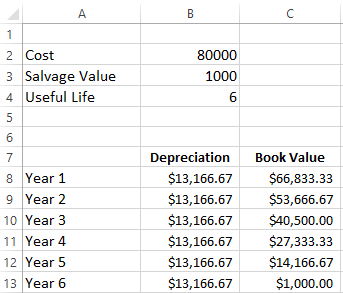
A company purchases machinery for $80,000. The machinery has an estimated salvage value of $1,000 and a useful life of 6 years.
🧮 Straight-Line Depreciation Interactive Calculator
📗 Using Excel’s SLN Function – Practice
In this example a company has purchased a piece of machinery that costs $80,000. The company believes that the machinery will have a Salvage value of 1000 at the end of the machines useful life of 6 years.
Excel makes calculating straight-line depreciation super easy with the SLN function!
=SLN(cost, salvage, lif)
Step-by-Step Excel Tutorial:
=SLN(
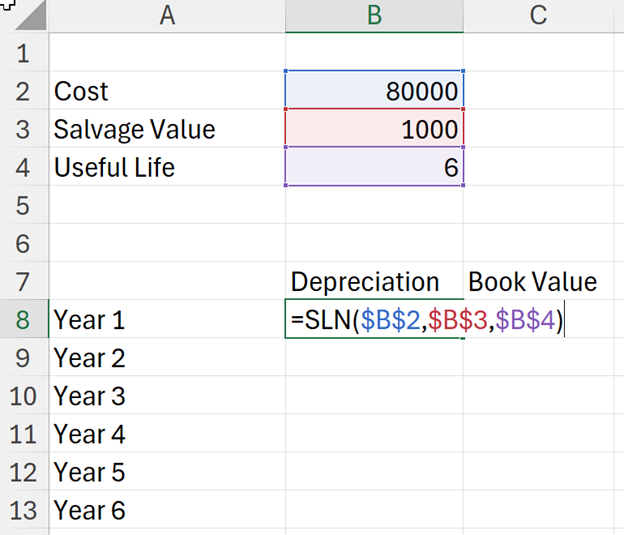
=B2-B8 (Cost minus first year depreciation)
=C8-B9 Press Ctrl + Enter (Previous book value minus current depreciation)